
Write bids faster – with every requirement and source in view
Writing a public tender response means more than filling pages. You need to answer the buyer’s questions, support your claims and keep every requirement in view. TedBid helps you save time on every bid and check what still needs an answer before you submit.
If you write bids for an IT consultancy, advisory firm or supplier in Denmark or the EU, start with the tender material. TedBid brings requirements, draft answers and document review together, so you spend less effort moving information between files.
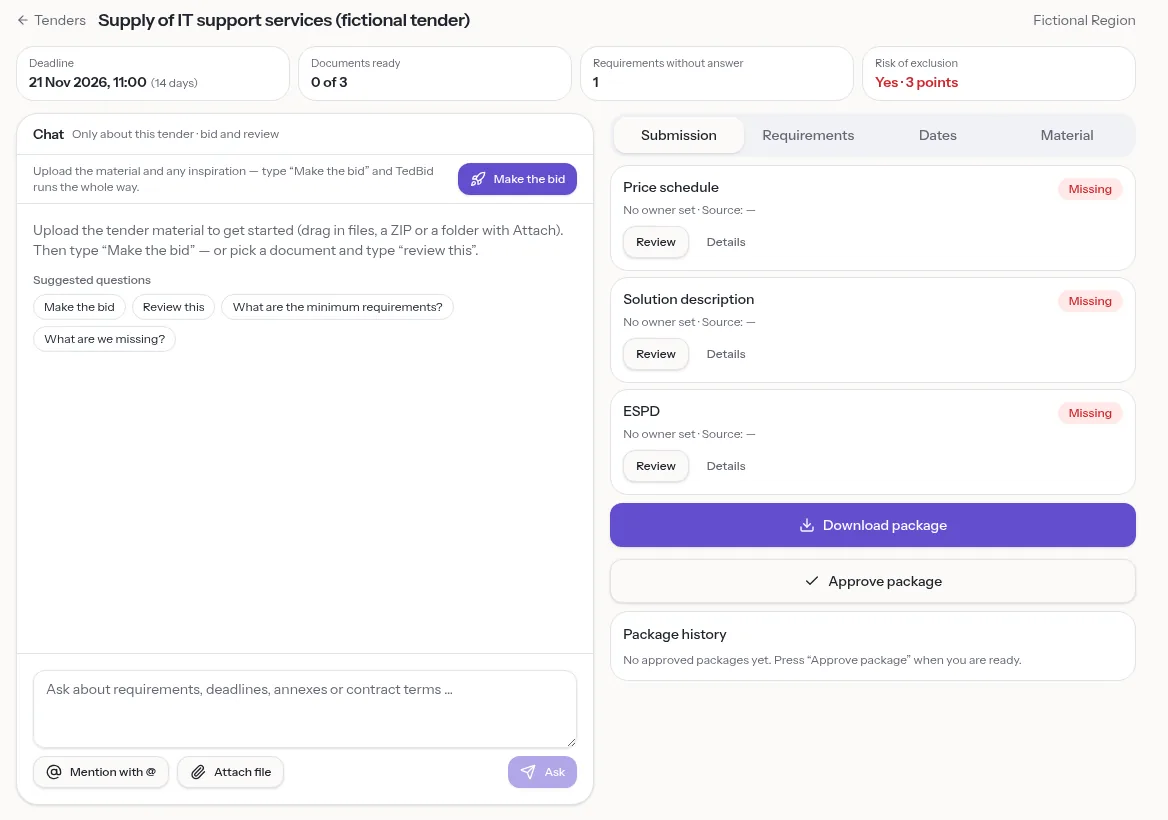
Bid writing software that starts with the buyer’s material
Upload PDF, Word, spreadsheets, text files or ZIP archives. TedBid finds requirements and links them to their source file and page. Word files appear page by page like the original, so you can check the wording in context.
The response structure comes from this tender, not a fixed template. Where information is absent, fields show that it is not stated in the material. You can tell an actual instruction from something you still need to clarify.
Turn requirements into a first draft
Use the chat for the current tender and type “Make the bid”. TedBid drafts each answer with sources. You then review the substance, add your company’s facts and decide what belongs in the response.
Keep the next step specific. Ask for a shorter answer or check which minimum requirements have no answer yet. The chat stays focused on this tender rather than mixing unrelated cases.
- Start from the requirement rather than a blank document.
- Check the source before relying on a drafted statement.
- Ask follow-up questions as you refine the answer.
Make missing evidence visible
A fluent paragraph is not enough if the facts are missing. TedBid marks missing facts with [MANGLER] (missing) and claims without a source with [TJEK] (check). You see where your input is needed instead of treating every sentence as finished.
Empty sales phrases and sentences without an actor are flagged too. Use those signals to replace broad promises with clear explanations of who does what.
Review against the criteria that matter
TedBid reviews documents against the tender’s own requirements and evaluation criteria. General writing tips appear separately, so you can tell a requirement issue from a style suggestion.
Accept suggestions with one click after reviewing them. A consistency check also finds differences such as company registration numbers and years across documents, before they reach your final package.
Reuse approved knowledge without skipping review
Save approved answers in your answer library with topics, and see when an answer was last used. Reuse stays inside your own organisation. This gives you a starting point without making an old response the default answer to a new question.
Before reusing wording, compare it with the current requirement and evaluation criteria, and check whether the supporting facts still apply.
How a bid runs in TedBid
A typical bid follows the same short path, whatever the tender looks like. You stay in control at every step, and you can stop and pick up again later.
- Upload the tender material and see the requirements, deadlines and documents to submit, each with a source.
- Decide go or no-go with minimum requirements and risks in one place.
- Type “Make the bid” to get a first draft of every answer.
- Fill the gaps marked [MANGLER] (missing) and check the claims marked [TJEK] (check).
- Run the pre-submission check, approve the package and upload it yourself in the portal.
Frequently asked questions
Can I use TedBid from Claude or ChatGPT?
Yes. Connect through MCP to read requirements, deadlines and documents and edit draft answers. Sign-in and consent are required. Nothing is approved or submitted automatically.
Is TedBid available in English?
The website is in English and Danish. The app interface is in Danish today. TedBid reads tender material in Danish and English.
Does TedBid submit the finished bid?
No. You upload the submission yourself. TedBid prepares a ZIP package with Word/PDF files and a QA report. You always answer impartiality and signing authority yourself.
Can I try it before choosing a paid plan?
Yes. The Free plan includes one active case and requires no payment card. Pro and Team plans are also available.
Try it on your next tender
Upload the material and see requirements, deadlines and the submission list with sources. Free plan, no card required.